Securing a typical home usually starts close to the building itself. Front doors, garages, patios, and nearby driveways are easy to monitor because they sit close to electrical outlets, home WiFi, and other existing infrastructure.
Large residential properties are different.
A long driveway may end hundreds of feet from the house. A detached workshop may sit beyond reliable WiFi coverage. A garden, rear gate, storage area, or wooded property edge may have no permanent power at all. Once security moves away from the main residence, the problem is no longer simply where to install another camera. The bigger challenge is how to monitor those areas without turning the entire property into a wiring and networking project.
The most effective approach is usually to treat different parts of the property as separate security zones. Areas close to the house can continue using conventional smart-home equipment, while more remote locations may benefit from cameras designed to operate with less power, less network infrastructure, and less maintenance.
Start With the Parts of the Property You Cannot Easily See
A large home does not necessarily become safer by adding cameras everywhere.
The first step is understanding where visibility begins to break down.
On many properties, the most difficult areas to monitor are not the front door or garage. They are the points where people or vehicles can enter the property without being immediately visible from the house. That may include the end of a long driveway, a side gate hidden by landscaping, a detached shed, a rear boundary, or a section of the yard bordered by trees.
These locations are important because they often sit outside both the homeowner’s normal line of sight and the coverage of existing security systems.
Camera placement should therefore follow the layout of the property rather than simply the locations where installation is easiest. A camera placed beside the house because power is convenient may provide less useful coverage than a camera positioned farther out where vehicles, visitors, or unexpected activity first enter the property.
That is where large-property security begins to differ from ordinary home security.
Improve Visibility Before Adding More Cameras
Technology helps, but it should not be the first answer to every blind spot.
Lighting, landscaping, fencing, and sightlines all influence how easily a property can be monitored.
Dense shrubs around an entrance can block views from both the house and a camera. Poor lighting around a detached building can make nighttime footage less useful. A gate that is hidden behind trees may remain difficult to monitor even after a camera is installed.
Before adding more equipment, homeowners should consider whether basic exterior changes can improve visibility.
Motion-activated lighting can be useful around high-traffic areas such as garages, side entrances, and workshops. Vegetation can be trimmed where it creates unnecessary blind spots, while camera positions can be selected to watch natural approach routes rather than simply facing open space.
These changes do not replace cameras, but they make the cameras that are installed more useful.
Conventional Security Cameras Work Best Near the House
Traditional smart security cameras remain a strong choice around the main residence.
They are well suited to front doors, garages, patios, and driveways close to the house because power and networking are already available. In these areas, continuous recording, cloud connectivity, smart-home integration, and frequent live viewing may all be useful.
The problem begins when the same type of camera is pushed farther into the property.
A conventional WiFi camera depends on a reliable connection to the home router or mesh network. Once the camera moves beyond that coverage, the homeowner may need to install repeaters, outdoor access points, or additional mesh equipment.
Power can create an even larger obstacle.
Running electricity to a distant shed, rear gate, or wooded boundary may require trenching, weatherproof conduit, and permanent changes to the landscape. What began as a simple camera installation can quickly become a small infrastructure project.
This is why a security camera for a large property should be evaluated not only by image quality or app features, but also by how much supporting infrastructure it needs at the installation point.
Battery-Powered Trail Cameras Can Cover Areas Beyond Existing Infrastructure
One alternative is to use cameras that were designed to operate without permanent power.
Trail cameras are commonly associated with hunting and wildlife observation, but their underlying design can also make them practical for certain property-security applications.
A trail camera typically spends much of its time in a low-power standby state. When motion is detected, it wakes, records an image or video, and then returns to standby. Because it is not continuously recording and transmitting, it can operate on battery power for much longer periods than many conventional always-on systems.
That creates more flexibility around a large property.
A security trail camera can be positioned near a remote gate, detached shed, garden boundary, storage area, or wooded edge without first extending electrical service to the location.
The camera can also store footage locally, which means it does not necessarily need an internet connection to remain useful.
This does not mean a trail camera should replace every smart security camera around the home. Its strength is different. It is useful where the goal is motion-triggered monitoring in places that are difficult or expensive to connect to permanent power and networking.
For large properties, that difference can make remote areas much easier to cover.
Local WiFi Can Add Convenience Without Extending the Home Network
Some battery-powered trail cameras also support a local WiFi connection.
This is different from the way most household smart cameras use WiFi.
Instead of requiring the camera to remain connected to the home router, a local WiFi trail camera can communicate directly with a nearby smartphone. The owner walks within usable range, connects to the camera, and can review recordings or use supported app functions without physically removing the SD card.
This can be useful around a detached shed, garden, backyard edge, or side gate that sits outside reliable household WiFi coverage but is still reasonably close to the home.
The advantage is that the homeowner does not need to extend the router’s network to the camera location. There is also no cellular data plan associated with the local connection.
A WiFi trail camera for backyard monitoring therefore provides a practical middle ground between a completely offline camera and a fully cellular system.
The limitation is that local WiFi remains local. Trees, walls, vehicles, terrain, and distance can all reduce usable range, and the homeowner still has to be close enough to connect directly to the camera.
For nearby outdoor zones, however, that may be all that is needed.
Larger Properties Need a Better Way to Connect Remote Cameras
Local WiFi becomes less convenient once the property grows beyond walking-distance monitoring.
A long driveway entrance, far gate, detached workshop, or several monitoring points spread across acreage may all sit too far from the main house for direct local access.
At that point, homeowners generally have three options.
They can extend the home network farther across the property. They can give each camera its own cellular connection. Or they can use a dedicated long-range wireless system that brings several remote cameras back to a central hub.
For properties organized around one main residence, the hub-based approach can be particularly useful because it avoids repeating the same infrastructure at every camera location.
How a Long-Range Hub System Works
A long-range hub system changes the way cameras connect back to the home.
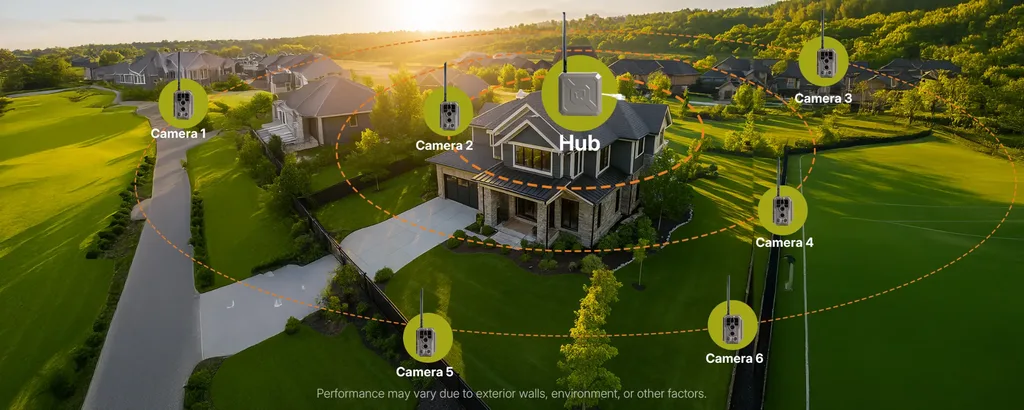
Instead of asking each remote camera to reach the household router directly, the cameras communicate with a dedicated hub through a longer-range wireless link. The hub is positioned closer to the main residence and connects the camera network back to the home’s existing network.
The basic architecture is:
Remote battery-powered cameras → long-range wireless link → central hub → home network → mobile app.
This matters because the household WiFi network no longer has to cover the entire property.
The cameras can remain farther away, while the hub acts as the bridge between those remote monitoring points and the home network.
Where GardePro Link 1.0 Fits
The GardePro Link 1.0 is one example of this kind of system.
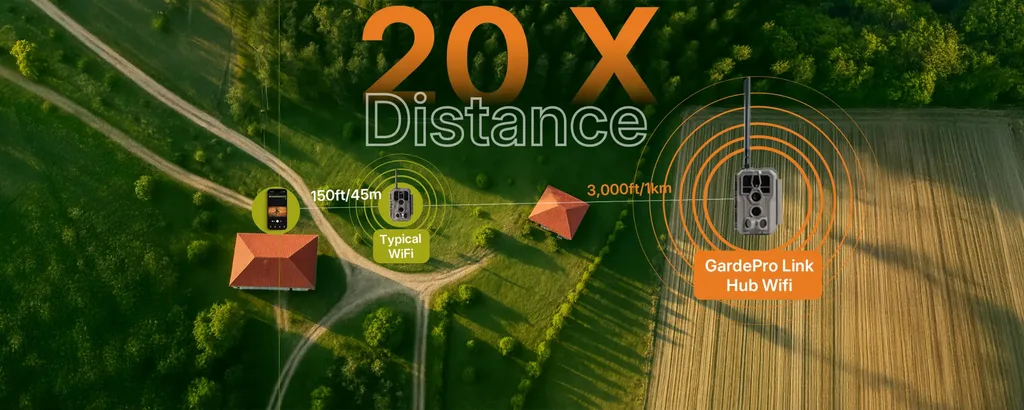
Its remote cameras communicate with a central hub over a dedicated wireless connection rated for up to 3,000 feet, or around 1 kilometer, in open and unobstructed conditions. The remote cameras remain battery powered, so a gate, workshop, storage building, or wooded perimeter does not need permanent electrical service just to support the camera.
The hub then connects the camera system back to the property’s existing home network.
For a large residential property, that can be simpler than extending household WiFi and electricity to every monitoring point. Multiple cameras can communicate through the same central system rather than each requiring its own independent cellular connection.
That also means the cameras do not need individual cellular subscriptions. For homeowners who want remote access around one large property without adding a separate monthly data plan to every camera, a long-range wireless security camera can be a practical alternative.
The important benefit is not simply the advertised range.
It is that the system allows security coverage to reach farther across the property without forcing the supporting infrastructure to follow every camera.
The 3,000-foot figure should still be treated as an open-area reference. Trees, buildings, terrain, dense vegetation, metal structures, and antenna placement can all reduce real-world wireless performance. Camera and hub locations should therefore be tested under actual property conditions before being treated as permanent.
Remote Access and Long-Range Coverage Are Not the Same Thing
One common source of confusion is treating all wireless cameras as though they solve the same problem.
They do not.
A local WiFi camera makes it easier to access a nearby camera without touching the SD card, but the user still needs to be within local wireless range.
A hub-based system allows cameras to sit much farther from the residence while still communicating back through the home’s existing network.
A cellular camera goes one step further by connecting independently to a mobile network, which can make it a better option for a completely separate property or a location several miles away from the main residence.
The right solution depends on the relationship between the camera and the property.
If the camera is close enough for occasional local access, local WiFi may be sufficient. If several cameras are spread across one large property, a long-range hub may be more convenient. If the monitoring point is truly remote from the residence, cellular may make more sense.
Choosing based on distance and infrastructure prevents homeowners from paying for connectivity they do not need or installing systems that cannot realistically reach the areas they want to monitor.
Maintenance Matters More the Farther the Camera Is From the House
Installing a camera is only part of the job.
The farther the camera is from the house, the more inconvenient every maintenance visit becomes.
A camera at the rear boundary of a property may be technically easy to install, but it becomes much less useful if batteries need frequent replacement or if the owner constantly has to walk out to check whether it is still working.
Low-power operation helps reduce that problem.
Motion-triggered cameras can use substantially less energy than systems built around continuous recording, depending on how frequently they are activated and how often wireless features are used.
Larger rechargeable batteries and compatible solar charging can extend deployment further, although actual performance will always depend on weather, temperature, sunlight, recording frequency, signal conditions, and user behavior.
The goal should not be to eliminate maintenance completely. Outdoor equipment still needs periodic attention.
The more realistic goal is to make maintenance infrequent enough that remote monitoring remains practical.
Privacy Should Be Considered Along With Coverage
Large properties often create long camera sightlines.
A camera aimed toward a gate may also capture a neighboring driveway. A camera near a rear boundary may see part of an adjacent property or public road.
That makes camera direction an important part of responsible installation.
Whenever possible, cameras should be aimed inward toward the property they are intended to protect. Homeowners should also consider local regulations governing residential surveillance and avoid collecting more footage than is necessary for the security purpose.
Wireless cameras are easier to move than permanently installed systems, but that flexibility should not come at the expense of thoughtful placement.
Build Security Around the Whole Property, Not Just the House
Large-property security works best when the system reflects the way the property is actually used.
The main residence may benefit from conventional smart security cameras. A nearby garden or shed may be easier to cover with a battery-powered or local WiFi trail camera. A long driveway, distant gate, or several remote monitoring points may justify a long-range hub system. A completely separate location may require cellular connectivity.
There is no need to force the same camera architecture into every part of the property.
The better approach is to match each zone with the level of power, connectivity, and maintenance it actually requires.
For homeowners with large yards, detached buildings, or acreage, this can reduce unnecessary wiring, avoid overbuilding the home network, and make remote monitoring much easier to maintain over time.
The best system is not necessarily the one with the most cameras. It is the one that extends useful coverage to the places that matter without making the property itself more complicated to manage.